
 October 15, 2025 in
This is a modification for Farming Simulator 25. It adds a “track assistant” (“GPS”) and a “snap to driving direction” feature, a parking brake, differential locks, wheel drive modes and improved hydraulics controls to your vehicle. It also shows more vehicle details on the HUD including a odo/tripmeter.
Known bugs
- Probably a lot… please report them.
The HUD explained
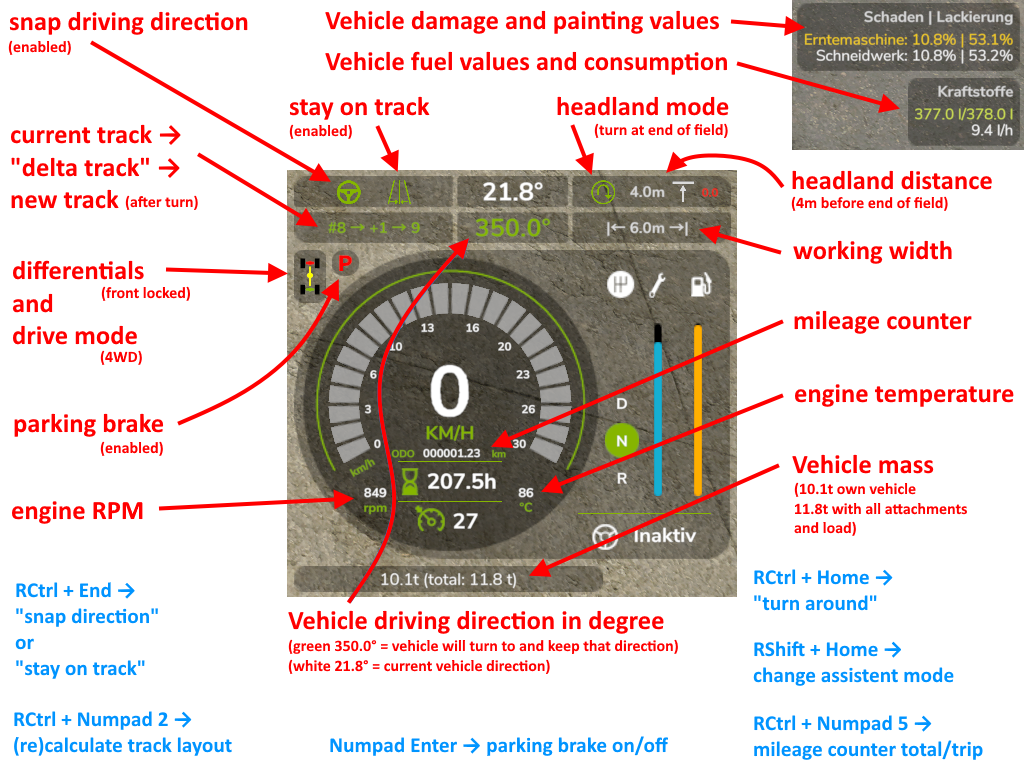
Default Keybindings
| Key | Action |
|---|---|
| R Ctrl+Num / | opens the config dialog to adjust various settings |
| Num Enter | apply/release parking brake |
| R Ctrl+End | snap to current driving direction or current track |
| R Ctrl+Home | reverse snap/track direction (180°) (= turn around) |
| R Shift+Home | change operational mode (snap to direction or snap to track) press & hold for one second to disable snap assistant |
| R Ctrl+Num 1 | re-calculate working width (e.g. spraying width changed) |
| R Ctrl+Num 2 | re-calculate track layout (e.g. direction changed or working width changed) |
| R Ctrl+Num 3 | cycle through the different show lines modes |
| R Ctrl+Num * | cycle through the different headland modes |
| R Shift+Num / / Num * | cycle through headland distances |
| R Ctrl+Num 4 / Num 6 | decrease/increase the number of turnover tracks |
| R Shift+Num 4 / Num 6 | move track layout to the left/right |
| R Ctrl+R Shift+Num - / Num + | move track offset line to the left/right |
| R Alt+Num - / Num + | decrease/increase track width |
| R Ctrl+Insert / Delete | move vehicle one track to the right/left without turning around |
| R Ctrl+PageUp / PageDown | increase/decrease snap/track direction by 1° |
| R Shift+PageUp / PageDown | increase/decrease snap/track direction by 90° |
| R Ctrl+R Shift+PageUp / PageDown | increase/decrease snap/track direction by 45° |
| R Ctrl+Num 5 | Switch between overall kilometer counter or trip kilometer counter. Press and hold to reset trip kilometer counter to 0 |
| R Ctrl+Num 7 | enable/disable front axle differential lock |
| R Ctrl+Num 8 | enable/disable back axle differential lock |
| R Ctrl+Num 9 | switch wheel drive mode between 4WD (four wheel drive) or 2WD (two wheel drive) |
| L Alt+1 | rear attached devices up/down |
| L Alt+2 | rear attached devices on/off |
| L Alt+3 | front attached devices up/down |
| L Alt+4 | front attached devices on/off |
What this mod does
- When the game starts, it changes all “motorized” and “controllable” vehicles on the map to default settings: wheel drive mode to “all-wheel (4WD)” and deactivation of both differentials.
- Press Ctrl+Numpad / to open the config dialog.
- Press R Shift+Home to enable the snap to direction or snap to track assistant.
- Press & hold R Shift+Home one second or longer to disable the snap & track assistant completely.
- Press R Ctrl+End to keep your vehicle driving in the current direction or on the current track.
- Press R Ctrl+Home to reverse snap/track direction (e.g. to turn around at end of field).
- Press R Ctrl+Numpad 2 to calculate a track layout based on current vehicle direction and implement working width.
- If you now enable snap mode the vehicle will drive on the current marked track.
- Press R Ctrl+Numpad 4/6 to adjust the turnover track number (from -5 to 5).
- Configure headland behavior in configuration menu or via keys.
- Press R Ctrl+Numpad 1 to (re-)calculate the working width. This will not change the current track layout.
- Press Numpad Enter to put your vehicle in parking mode. It won’t move an inch in this mode.
- On HUD it displays:
- (When snap/track is enabled) The current snap to angle and current track and turnover number.
- Damage values in % for controlled vehicle and all its attachments.
- Fuel fill level for Diesel/AdBlue/Electric/Methane and the current fuel usage rate1.
- The overall kilometer counter of the vehicle or the current trip kilometer.
- The current status of the differential locks and wheel drive mode.
- The current engine RPM and temperature1.
- The current mass of the vehicle and the total mass of vehicle and all its attachments and loads.
- Keybindings can be changed in the game options menu.
1 In multiplayer games, all clients, except the host, won’t display the fuel usage rate and engine temperature correctly due to GIANTS Engine limitations
What this mod doesn’t (fully) do
- Work on consoles. Buy a PC for proper gaming.
Changelog:
Credits:
Download mod
| File | File size |
|---|---|
 FS25_EnhancedVehicle
|
186 KB |


This mods removes the “Bale size” from showing in the F1 menu. I can’t see what bale size I have selected
it’s nice mod, can someone make trip computer that show momental consumption in l/100km?
good, although missing the tractor load scale and wheel slippage in %
I like what it says it will do but I’m sure it will conflict with the real vehicle breakdown mod being it also shows temperature and rpm but idk i may try it to see but I’d like to have everything else that comes with it though especially the drive mode options and showing mileage rather hours
it’s not related to this mod just fyi, but does anyone know where to find a couple of john deere tractor mods with only metal wheels from the 1900s and where to find a DMI gravity wagon? if anyone knows how or where to find them pls tell me where there are or send me the link through this chat pls and thank you:) (just fyi the mods have to be spisifcly for fs25
go away
boi, what is that spelling.
This mod has allowed me to create new fields with straight edges, just what I have spent 3 days looking for. Thanks, and well done
Hey is anyone else getting server problems with this mod
It works fine but the server keeps saying this ram issue and slowing down the server
Ps keep up the good and great work
Have you ever found a mod that does the one thing you are looking to do, but it also does about 50 things you don’t need and are afraid to add?
Yeah, that’s this mod. All I want is to lock direction so I can make nice straight edged fields on my server. That’s it, GPS lock at certain degree increments.
No one will ever memorize all the hotkeys for this mod (as well as all the others the game has). I get a real sense of feature creep. Congrats on the dev for accomplishing all they did, but I really need a “light” version.
I print them out until I can remember the keys that I use, also remember you can alter the keys to a key that are more convenient.
i have degree numbers overlapping
how do i enable the hud to turn everything on
Mod seems to work in single player but not in multi on a server.
This mod is so extensive and detailed, that it should be made/setup in the SIM-Dashboard app, to create a proper overview?!
hello, can you make a menu, to put the damage and the fuel in the corner right?